The tech world is buzzing with talk about "AI agents" as the next big breakthrough, but the truth is simpler: they're already the invisible backbone of many tools transforming how we work, research, and create. Yet for most people, agents remain a mystery wrapped in technical jargon and protocol acronyms. I promise, I will not be copy-pasting MCP and A2A definitions. This is not that kind of article.
Just like in a previous article where I explained how large language models work without diving into complicated math equations, I want to help you understand what agents really are: not through complex definitions or technical specifications, but through the intuitive lens of what they do and why they matter.
By the end of this article, you'll recognize agents in action and understand why they represent such a fundamental shift in how we interact with AI.
1. What Are AI Agents? The Basic Definition
Think of an AI agent as a digital assistant that can actually do things, not just answer questions. While a traditional chatbot might tell you about the weather, an agent can check the forecast, reschedule your outdoor meeting, and send apologies to attendees: all from a single request.
At its core, an agent is AI that can:
- Plan a sequence of actions to achieve a goal
- Use tools like web browsers, calculators, or databases
- Make decisions about what to do next based on results
- Iterate until the task is complete
Here are four simple examples to illustrate:
The Math Agent:
You ask it to "calculate 15% of $12,450." The agent recognizes this is a math problem, uses its calculator tool, and gives you the answer with the calculation shown.
You: "Calculate 15% of $12,450" ↓ Agent: Use calculator → $12,450 × 0.15 = $1,867.50
The Web Search Agent:
You ask "What's the weather in Paris today?" The agent searches the web, finds current weather data, and gives you a simple answer.
You: "What's the weather in Paris today?" ↓ Agent: Search weather sites → Find current data → "22°C, sunny"
The Query Selection Agent:
You ask "How are our sales doing?" The agent looks at your question, decides which of your 5 pre-built database queries to run, and returns the results.
You: "How are our sales doing?" ↓ Agent: Choose "monthly_sales_report" query → Run query → Return results
The Email Data Agent:
When you get a new customer email, the agent reads it, pulls out the customer name and company, then adds a row to your Google Sheet.
You: [New email: "Hi, I'm John from ABC Corp, interested in pricing"] ↓ Agent: Extract name "John" → Extract company "ABC Corp" → Add to spreadsheet
Notice the pattern? Each agent takes a complex, multi-step task and breaks it down into manageable actions, using different tools and capabilities as needed. They're not just generating text: they're actually accomplishing goals.
2. Examples of Agents in Tools You Already Use
The agents we just described aren't theoretical: they're already powering features in tools you likely use every day. You've probably interacted with dozens of agents without realizing it.
ChatGPT's Data Analysis:
When you upload a CSV file to ChatGPT and ask it to "analyze this data," you're not just getting text responses. Behind the scenes, an agent is working with multiple capabilities:
"First, read this CSV file using Python code" → writes pandas code → executes it → loads your data. "Now create visualizations to show patterns" → generates matplotlib code → runs it → displays charts. "Calculate key statistics and identify trends" → writes statistical functions → executes calculations → interprets results. "If you find something interesting, dig deeper" → decides to run additional analysis based on initial findings. "Present findings in a clear summary" → formats results → writes explanations → creates final report.
Perplexity:
What looks like a simple search is actually an agent orchestrating a research process:
"Search for recent information on this topic" → generates search queries → calls search APIs → retrieves results. "Read these articles and extract key facts" → fetches full articles → parses content → identifies relevant information. "Check if sources agree or contradict each other" → compares facts across sources → flags inconsistencies. "Combine the most reliable information" → weighs source credibility → merges compatible facts. "Always cite where each fact came from" → tracks source URLs → formats citations → links claims to origins.
Cursor:
While you're coding, Cursor's agent is continuously working alongside you:
"Read all the code in this project to understand context" → scans files → builds syntax tree → maps relationships. "Predict what the developer wants to write next" → analyzes cursor position → suggests completions → ranks options. "Watch for syntax errors as they type" → parses code in real-time → flags errors → suggests fixes. "Remember the patterns and style they prefer" → learns from user choices → adapts suggestions → maintains consistency. "Suggest better ways to write this code" → analyzes for improvements → proposes refactoring → explains benefits.
Gamma AI:
When you ask it to create a presentation, Gamma's agent handles the entire design process:
"Understand what this presentation is about" → analyzes text content → identifies key themes → determines presentation type. "Choose a design style that fits the content" → selects from template library → matches tone and purpose. "Find or create images that support the message" → searches image databases → generates visuals → ensures relevance. "Organize information in a logical flow" → breaks content into sections → creates slide hierarchy → sequences ideas. "Make sure everything looks consistent" → applies color schemes → standardizes fonts → aligns elements.
These are agents using tools, making decisions, and completing tasks. The next time you use any of these features, you'll recognize the agent pattern in action.
3. How a Basic Agent Works: Building One with Claude Code
To really understand agents, let's walk through building a simple one. I used Claude Code to create a math-solving agent that demonstrates the core concepts we've discussed.
The Goal:
Create an agent that can solve complex math problems by breaking them down into steps and using different mathematical tools.
Think of this like giving someone a calculator. An LLM, like the language part of our brain, cannot handle complex math on its own. Just as you might do simple addition mentally but reach for a calculator for "347 × 892," the agent uses its language understanding to recognize when it needs mathematical tools and which ones to use.
The Agent in Action:
Here's how the agent handles a multi-step math problem:
You: "Calculate 15 squared, then add 30, then find the square root of that result"
     ↓
Agent: "I need to solve this step by step" → identifies three operations needed
     ↓
Agent: "First, calculate 15 squared" → uses power tool: 15² = 225
     ↓
Agent: "Now add 30 to that result" → uses add tool: 225 + 30 = 255
     ↓
Agent: "Finally, find square root" → uses square_root tool: √255 = 15.97
     ↓
Agent: "The answer is 15.97"

You: "Now calculate the cosine of that result"
     ↓
Agent: "I'll use the previous result" → remembers 15.97 from conversation history
     ↓
Agent: "Calculate cosine of 15.97" → uses cosine tool: cos(15.97) = -0.97
     ↓
Agent: "The cosine is -0.97" → presents final result
This is the exact interaction between me and the agent:
🤖 Interactive Math ReAct Agent
========================================
Ask me math questions and I'll solve them step by step.
I'll remember our conversation history!
Type 'quit', 'exit', or 'q' to exit.

You: Calculate 15 squared, then add 30, then find the square root of that result
🤖 Agent: The final result is approximately 15.97.

You: Now calculate the cosine of that result
🤖 Agent: The cosine of 15.9687194226713 is approximately -0.97.
Notice what's happening here: the agent isn't just responding with text. It's breaking down a complex problem into individual steps, using different tools for each calculation, and building on previous results. When you ask the follow-up question, it remembers the earlier answer (15.97) and uses it for the new calculation. This is fundamentally different from a simple LLM chatbot that would try to do all the math in its "head" and likely get it wrong.
The ReAct Pattern:
The agent follows a simple cycle called "Reasoning and Acting":
- Reason: "I need to solve this step by step" → analyzes the problem and plans
- Act: Uses the power tool → actually performs the calculation
- Observe: Gets result "225" → evaluates what happened
- Reason again: "Now I need to add 30" → decides on next action
- Act again: Uses add tool → continues the process
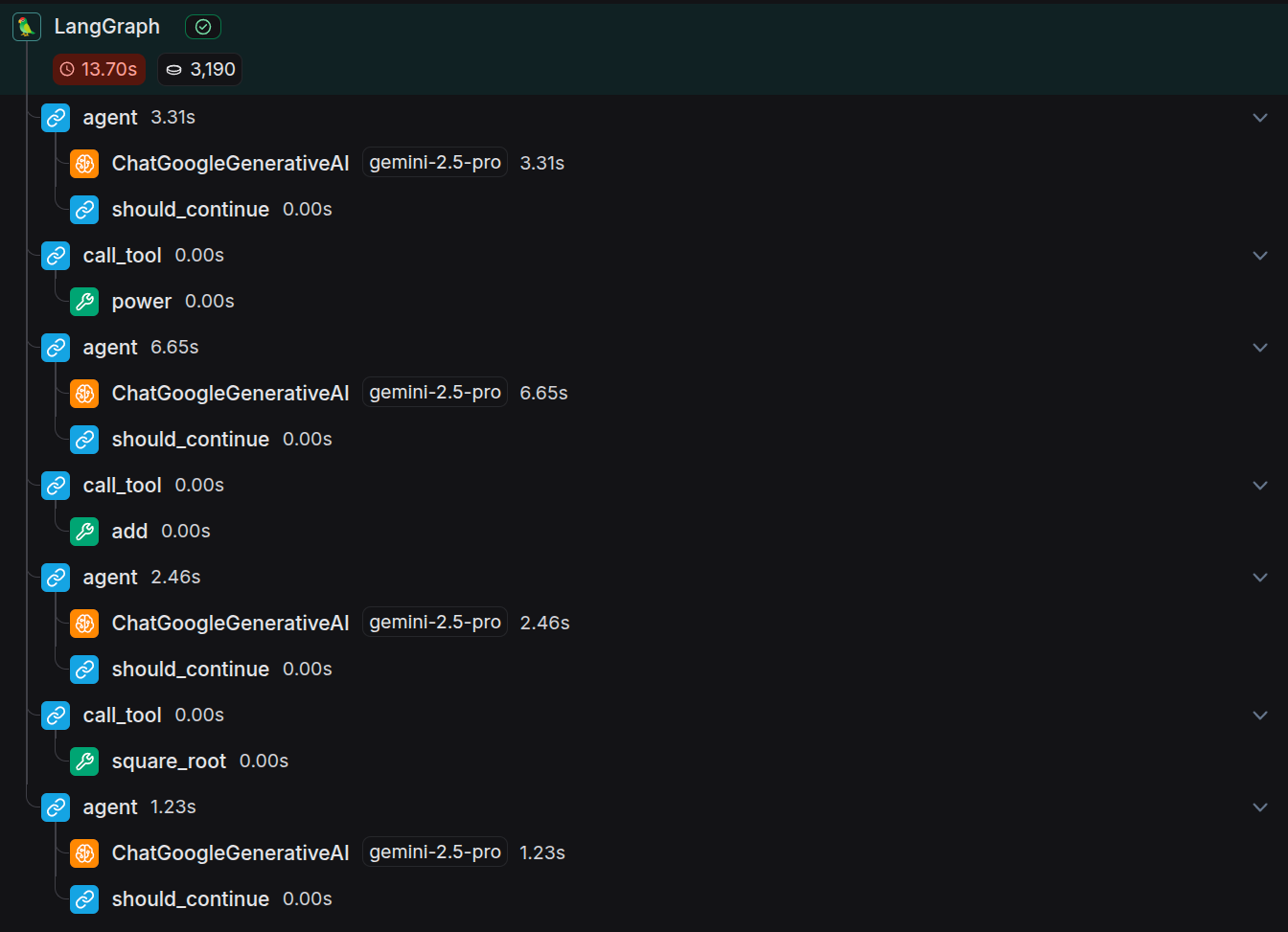
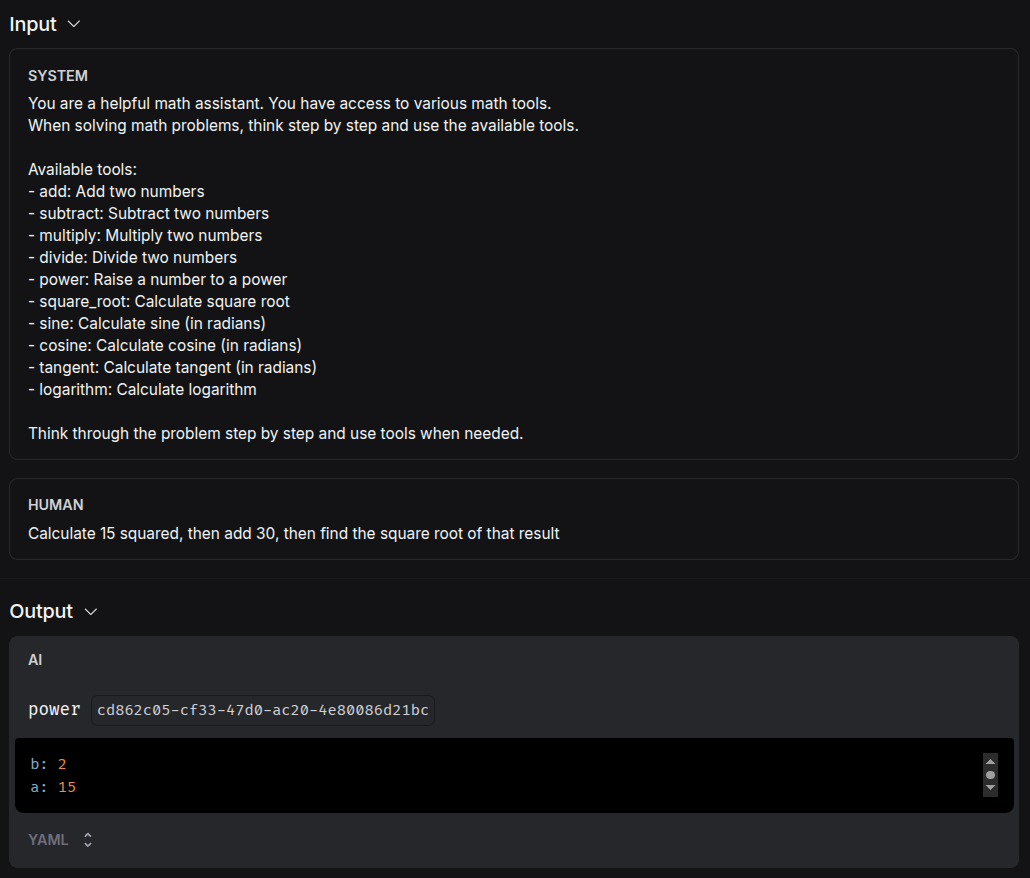
When I built this agent, LangSmith (a tool for monitoring AI agents) automatically captured every step of the execution. In the trace, you can see each reasoning step as one block, followed by each tool call as another block. The trace shows the agent thinking, then acting, then thinking again - proving that it's not just generating text about math but actually executing multiple tool calls in sequence to solve the problem.
How the agent understands the which tool to use:
Each mathematical function has a clear description that tells the agent exactly what it does:
@tool
def power(a: float, b: float) -> float:
    """Raise the first number to the power of the second."""
    return a ** b
The agent reads that description and knows: "This tool takes two numbers and raises the first to the power of the second." It can then decide when and how to use each tool.
The agent also receives clear instructions about its role:
You are a helpful math assistant. You have access to various math tools.
When solving math problems, think step by step and use the available tools.

Available tools:
- add: Add two numbers
- subtract: Subtract two numbers
- multiply: Multiply two numbers
- divide: Divide two numbers
- power: Raise a number to a power
- square_root: Calculate square root
- sine: Calculate sine (in radians)
- cosine: Calculate cosine (in radians)
- tangent: Calculate tangent (in radians)
- logarithm: Calculate logarithm

Think through the problem step by step and use tools when needed.
The framework:
What makes this an "agent" rather than just a calculator is that it can:
- Plan: "I need to do A, then B, then C to solve this"
- Reason: "The result doesn't look right, let me try a different approach"
- Adapt: "The user asked for more precision, let me recalculate"
- Explain: "Here's why I used these specific steps"
This framework can apply to many business processes. Replace the math tools with database queries ("find all customers who haven't purchased in 30 days"), email actions ("send follow-up messages to that list"), network monitoring ("check server health across all regions"), or financial operations ("calculate monthly recurring revenue and compare to last quarter"). The agent structure remains identical: it reasons about the problem, uses the right tools in sequence, and adapts based on results.
This simple math agent demonstrates the same patterns we see in ChatGPT's data analysis, Perplexity's research, and all the other agent-powered tools. The only difference is the complexity of the tools and the sophistication of the reasoning: but the fundamental structure remains the same.
Conclusion
AI agents are already transforming how we work today. From ChatGPT's data analysis to Perplexity's research capabilities, you're likely using agent-powered tools every day without realizing it.
The math agent I built demonstrates that creating useful agents doesn't require a PhD in computer science. It's about understanding the simple pattern of reasoning, acting, and observing that we've explored throughout this article. Whether you're automating customer outreach, analyzing business data, or monitoring system health, the fundamental structure remains the same.
Here's the remarkable part: this entire article was written with Claude Sonnet, and the agent code was generated by Claude Code. With some guidance on my part, what would have taken me 10 times longer to research, write, and code was accomplished in a fraction of the time. The power lies in AI agents specifically. Claude Code didn't just generate text about programming; it reasoned through the agent architecture, wrote functional code, created proper documentation, and even set up the project structure. Claude Sonnet didn't just write sentences; it researched concepts, structured arguments, and adapted the content based on feedback.
If you're curious to explore further, the complete code for this math agent is available on GitHub, so you can see exactly how it works and even build your own variations. The barrier to entry for agent development has never been lower, especially when you have agents helping you build agents.
The next time you use any AI-powered tool, you'll recognize the agent patterns in action. And perhaps more importantly, you'll start seeing opportunities to apply these same concepts to solve problems in your own work.
What business process in your organization could benefit from an agent approach? The answer might surprise you.