
Ever tinkered with a Large Language Model (LLM) and thought, "This is fun, but could it do more than just chat?" You're definitely not the only one. LLMs have become pretty common in our digital routines, showing up in chatbots and text generation tools. But here's the twist: they're capable of much more than casual conversation.
Picture this: an AI that doesn't just reply but actually gets things done. One that can follow a sequence of steps to solve more complex tasks, turning one-off chats into full-blown automated workflows.
There are plenty of solid ways to build these kinds of AI systems. But if you're looking to experiment quickly and bring your ideas to life, n8n is a great tool to check out. This low-code automation platform makes it easy to create smart, multi-step AI workflows without a lot of fuss.
1. LLMs: Ditching the Chatbot!
The real magic of LLMs starts with one simple idea: they generate text based on input. At their core, they're straightforward machines. You give them some text, and they give you text back. The prompt you write acts like a blueprint, shaping the response to fit your needs.
But here's where it gets interesting. That text output? It's incredibly flexible. It's not just about writing emails or translating phrases. LLMs can generate instructions, structured data, or even commands that other systems can understand. If something can read and process text, it can probably work with what an LLM produces.
This flexibility opens the door to something cool: chaining prompts together. You can break a big task into smaller ones, feed each one into the model with a specific prompt, and let the output of one step become the input for the next. It's not just chatting with AI anymore. You're building a step-by-step process that runs like a tiny digital assembly line.
This kind of setup really shines when you're dealing with huge amounts of information. Imagine trying to comb through thousands (or millions) of customer reviews, news articles, forum posts, or product descriptions. Doing it by hand would be a nightmare. But with a smart chain of LLM prompts, you can process each piece automatically and pull out useful patterns. Suddenly, that mountain of text turns into clear, organized insights that are ready to use.
So when we talk about LLMs generating "text," we're talking about something much bigger than just words. These outputs can directly drive your workflows, like:
- Executable Code: Python or JavaScript snippets that can run without a human in the loop
- Function Calls: Machine-friendly commands for tools and APIs
- Database Queries: Clean SQL or NoSQL for fetching or updating data
- Structured Formats: JSON, XML, or anything a system needs to stay organized
- Metadata Tags: Labels and keywords to help categorize content
- Classification Labels: Quick identifiers like "spam," "positive," or "urgent"
- Conditional Instructions: Logic-based steps to guide what happens next
- AI Preprocessing: Cleaned-up input meant for another model to work its magic
This kind of prompt chaining turns LLMs into more than just clever responders. They become handy little automation agents, ready to help build smart, flexible systems. Once you see just how much this "text" can do, a whole new world of possibilities opens up.
2. Putting AI to Play: Real Use Cases
The beauty of orchestrating LLM prompts is that it lets us tackle tasks that are too tedious, too complex, or simply too large for humans to manage efficiently. Let's walk through a few ways to put AI to work with smart, structured prompt chains:
Customer Feedback Funnel
Prompt 1 (Classification): Each review goes into the LLM, which tags the sentiment (positive, negative, or neutral) and identifies the mentioned product or service. Prompt 2 (Pain Point Extraction): Only negative or neutral reviews are passed forward. A second prompt pulls out specific complaints, like "delayed shipping" or "missing parts." Prompt 3 (Summarization and Action Suggestion): Using the sentiment and pain points, a third prompt creates a summary for the product team and suggests next steps. This could include a draft response, a support ticket, or a trend report.
Dynamic Content Generation
Prompt 1 (Outline Generation): You give the LLM a topic and tone, and it returns a detailed outline for an article, ad, or campaign. Prompt 2 (Section Drafting): Each outline section is sent back to the LLM to generate a first draft. You can specify tone or style here too. Prompt 3 (Platform Adaptation): The full draft is then reformatted for specific channels: a snappy tweet, a professional LinkedIn post, or a casual email subject line.
Lead Qualification and Enrichment
Prompt 1 (Company Research): Feed in a company name. An LLM (with external search tools connected) gathers public data like industry, size, and recent activity. Prompt 2 (Relevance Scoring): Based on that data, another prompt evaluates how well the company aligns with your product and assigns a lead score. Prompt 3 (Custom Outreach): Using both the summary and score, the final prompt drafts a personalized message with relevant talking points and current context.
Automated Database Reporting
Prompt 1 (Query Generation): You ask a question in plain language, like "What were our top-performing products last quarter by region?" The LLM turns that into a proper SQL query. Execution Step: The query runs on your database (handled outside the LLM), and the data is pulled. Prompt 2 (Data Interpretation): The raw results are sent back to the LLM to spot trends, flag anomalies, or summarize key findings. Prompt 3 (Report Writing): Another prompt packages those insights into a clean, easy-to-read summary or executive briefing.
Document Analysis
Prompt 1 (Document Type Detection): Each document is automatically categorized. Is it a contract? A support ticket? A white paper? Prompt 2 (Summary and Key Points): Based on its type, a summary is generated that captures key topics, arguments, or clauses. Prompt 3 (Data Extraction): Names, dates, amounts, and terms are pulled out with precision into a structured format like JSON or CSV. Prompt 4 (Metadata Tagging): The document and its data are labeled for easy search, routing, or compliance checks.
Network Monitoring
Prompt 1 (Alert Breakdown): Feed raw logs into the LLM to summarize the alert's severity, components involved, and likely root cause. Prompt 2 (Suggested Response): Combine the alert summary with documentation or past incident data to suggest a troubleshooting step, all wrapped into a concise recommendation. Prompt 3 (Action or Escalation): Depending on the confidence level, the next prompt generates a ready-to-run command, a support ticket, or an escalation message to a human team.
These examples are just the beginning. Traditional code and rule-based systems still have their place, especially for predictable tasks with strict rules. But LLMs really stand out when you're working with natural language, unstructured data, or constantly changing formats.
The real power comes from how modular this setup can be. You don't have to squeeze everything into one giant prompt. Instead, you can break things into smaller, focused steps. Each step can have its own data, its own context, and even its own model.
You can bring in tools, give specific instructions, and use different models for different parts of the workflow. If one step works better with a fine-tuned model or a domain-specific one, no problem. Each part of the chain is independent, so you can mix and match as needed without trying to force it all into a single prompt.
This flexibility means you can connect workflows like building blocks. Maybe you start with a Customer Feedback Funnel, layer in Automated Reporting to track trends, then bring in Document Analysis to surface related support issues. Each step adds value, and the entire system becomes smarter and more useful over time.
LLMs aren't just text generators. They're flexible problem-solvers you can plug into complex workflows, helping you automate faster and smarter without locking you into rigid systems.
3. Say Hello to n8n: Your Workflow Sidekick
We've talked about the incredible potential of LLMs beyond simple chat, and explored some truly exciting use cases where chaining prompts unlocks automated superpowers. But how, you might wonder, do you actually build these intricate chains without becoming a full time coding guru? This is precisely where n8n steps onto the stage, ready to be your most valuable workflow sidekick.
So, what exactly is n8n? At its heart, n8n is a powerful, open source, low code automation platform. Think of it as your digital LEGO set for connecting pretty much anything to anything else.
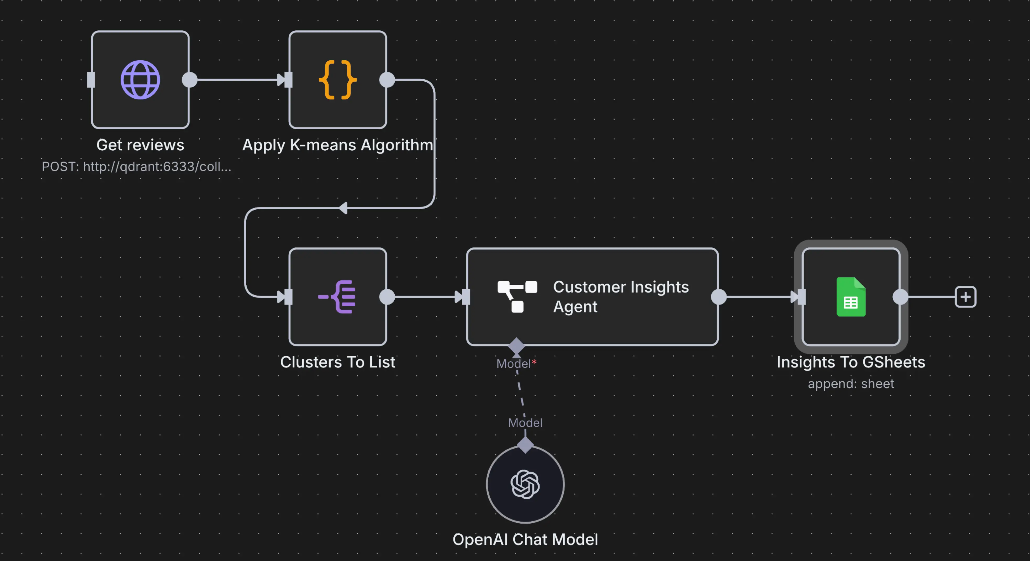
What makes n8n particularly brilliant for orchestrating those clever AI workflows we just discussed? It's a combination of fantastic features:
- Visual Workflow Building: Map out prompt chains by connecting nodes in an intuitive interface. Fast prototyping enables team collaboration and lets you validate AI workflows before full code implementation.
- Extensive Integrations: Hundreds of pre-built nodes connect to LLM providers, databases, CRMs, marketing platforms, and APIs, integrating AI workflows into your existing tech stack.
- Flexible Data Handling: Excels at capturing, transforming, and passing data between nodes. Crucial for feeding LLM outputs into next prompts or external systems.
- Logic and Loops: Add if/then conditions and looping for complex workflows like processing bulk reviews, conditional emails, or dynamic prompt selection based on classifications.
- On-premise Option: Run locally or self-host for full data privacy and control.
- Custom Code Support: Includes a "Code" node for specific transformations. Non-coders can ask LLMs to generate needed code snippets.
In essence, n8n bridges the gap between the complex capabilities of LLMs and the desire for rapid, accessible automation. The best part is, you're not stuck using a single model or approach. Each step in your workflow can have its own prompt, its own context, its own tools, and even its own LLM. You can use fine-tuned models for some steps, general-purpose models for others, and pull in custom data or external tools as needed. You are not forced to cram everything into one big prompt.
It allows you to turn abstract AI ideas into working systems, even without deep coding skills. If you're dreaming up clever workflows, n8n is the tool that helps you actually build them.
4. n8n Basics: Building Your AI Workflow
Now, before we dive deeper into crafting your own AI masterpieces, a quick note: this isn't meant to replace a full n8n tutorial (like the excellent Master n8n in 2 Hours: Complete Beginner's Guide). Think of this section as your VIP backstage pass, offering a high-level look at the core ideas behind building intelligent workflows with n8n.
At its core, n8n is all about visual workflows. You connect blocks, called nodes, to define a sequence of actions. Data flows through these nodes, with each one performing a specific task. It's simple and intuitive: data goes in, something happens, and the result moves on to the next step.
Let's explore the types of nodes that make up your n8n toolkit.
The Starting Line: Trigger Nodes
Every workflow needs a place to start, and that's what trigger nodes do. They act like doorbells, kicking things off when something happens or at scheduled times.
- Schedule Trigger: Runs your workflows on a set schedule, like every day or every hour. Great for reports, checks, or cleanups.
- Webhook Trigger: Starts your workflow when it receives data from an external app. Ideal for real-time responses.
- App Specific Triggers: These nodes respond to events inside apps like Gmail, Outlook, Telegram, Instagram, or Google Sheets.
- Chat Trigger: Starts a workflow based on a message or command from an internal chat, perfect for bots or automated replies.
- Database Triggers: Begins workflows when something changes in your database.
- Manual Trigger: You click a button and it runs. Simple, useful for testing or one-off executions.
App Specific Nodes
These come with built-in integrations to popular services. They handle the messy details of authentication and API calls for you.
Examples: Gmail, Outlook, Google Sheets, Salesforce, HubSpot, Slack, Shopify, Trello, Asana, Stripe, and more. Use them to send emails, update spreadsheets, sync CRM records, post messages, and so on.
Database Nodes
Perfect for when you want to interact directly with your data. These nodes let your workflows read from, write to, or update databases.
Examples: PostgreSQL, MySQL, SQL Server, MongoDB, Airtable, and others.
API Calls & Webhooks
When you need to connect to a service that doesn't have a prebuilt node, or if you're doing something custom, these nodes are your go-to.
- HTTP Request Node: Makes calls to any web API. You can pull in data or send it out to another system.
- Webhook Nodes (as action): Can be used to receive data from external services to start a workflow (when used as a trigger), or to send data from your workflow to another system expecting a webhook (when used as an action).
Logic and Data Transformation Nodes
These are the tools that help shape your workflow and manage data behind the scenes.
- If Node: Adds decision logic to take different paths depending on the data.
- Looping Nodes: Handle lists or repetitive actions, like processing thousands of reviews one by one.
- Data Manipulation Nodes: Use nodes like Set, Merge, Split in Batches, and Item Lists to reshape and structure your data.
- Code Node: Add custom JavaScript when you need it. Don't know how to write the code? Ask an LLM and paste it in.
Basic LLM Nodes
These connect your workflow directly to models like GPT-4, Gemini Pro, or Claude 3. All you need is your API key and a prompt.
You provide the input, the model returns text. That output can flow straight into another LLM node, another service, or a database. This setup makes multi-step, smart workflows easy to create and modify.
AI Agent Nodes
Beyond fixed steps, n8n lets you build full-on AI agents. These are goal-driven setups where the LLM chooses which tools to use from a set you provide.
You give the agent a goal and a toolbox (other n8n nodes like Database Read, HTTP Request, Email Send). The agent picks the right tools and figures out how to use them to reach the goal. Agent Example: "Goal: Generate a weekly sales summary and email it to the sales manager." Tools: PostgreSQL node for querying data, Google Sheets node for intermediate storage, an LLM node for summarizing, and an Email node for sending the report. The agent decides what to use and in what order, based on your goal.
Stuck on a concept? Ask your LLM:
- Not sure what a webhook is or how it works? Ask it to explain.
- Unsure how to compare SQL vs NoSQL? Ask for a simple breakdown.
- Have an automation idea but not sure how to structure it in nodes? Just describe your goal and get a suggested setup.
- Need a code snippet for a specific transformation? Ask the model and copy it into a Code node.
This combination of LLM intelligence and low-code flexibility means you're never far from the answer. Your LLM isn't just a tool for text. It's your tutor, assistant, and builder all in one.
n8n gives you the framework. LLMs give you the brainpower. Together, they open the door to building smart, adaptable workflows that actually get things done. Whether you're new to automation or building complex systems, the tools are in your hands, and the support is always just a prompt away.
5. See It in Action: An AI Workflow Comes Alive
Here's what this automation looks like in n8n:
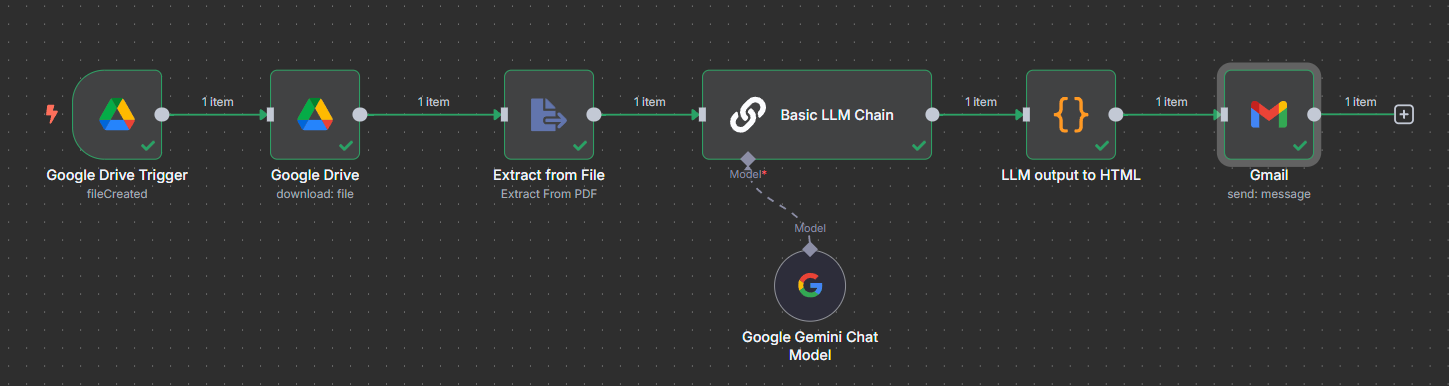
Let's make this tangible. Imagine you're a busy market analyst, and every week, a new market report lands in a specific folder in your Google Drive. It would be helpful to quickly extract the top 10 insights from that report. Manually reading each report might just be unfeasible if you receive hundreds of them a month.
This workflow, created in less than 20 min, is designed to detect a new report added to a Google Drive folder, extract insights using an LLM, and email them:
Google Drive Trigger (fileCreated): Your Workflow's Tripwire
This is where our automation journey begins! The Google Drive Trigger node acts as a digital tripwire, constantly listening for a 'fileCreated' event in your specified Google Drive folder. The moment a new report file appears, this node springs into action, gathering basic information about the new file and passing it along to the next step. Here is a guide to configuring the credentials: Set up Google Credentials in n8n in 5 minutes
Google Drive (download: file): Grabbing the Goods
Once the Trigger signals a new file, the dedicated Google Drive node steps in. It uses the information received from the Trigger to fetch the actual content of that newly added report file. Think of it as reaching into the folder and pulling the document out, ready for inspection.
Extract from File (Extract From PDF): Accessing the Report's Text
Now that we have the report file, we need its text! The Extract from File node, specifically configured for Extract From PDF, takes the downloaded file and diligently pulls all the readable text content out of it. This is a crucial step, transforming a complex file format into plain text that our LLM can understand.
Basic LLM Chain: The Brains of the Operation
Here's where our Large Language Model truly shines! The Basic LLM Chain node receives the extracted text from the PDF. This is where you would configure your prompt, giving the LLM instructions like: "Analyze the following report and identify the top 10 most important insights, presenting them as a concise bulleted list." This node is powered by Gemini to process the text and generate the desired insights. The output here is raw, insightful text. Here is the prompt used
Please generate 10 key insights from this report. Format your output into json format item = insight. No text before or after.

 {{ $json.text }} -- This just mean the text from the PDF
I am purposely only using one prompt, but as illustrated before, nothing stops you from using the output of this AI node as the input of a new one
LLM output to HTML: Making it Pretty for Your Inbox
While our LLM is brilliant at generating text, raw text isn't always the prettiest for an email. Here, we used a Code node (yes, one of those!) which takes the plain text insights generated by the LLM and formats them into clean, readable HTML. The best part? The actual code snippet for this transformation was simply copy pasted from an AI's suggestion, proving you don't need to be a developer to make things look professional! This ensures your emailed report summary looks great and is easy to digest in any email client.
Gmail (send: message): Delivering the Daily Dose of Wisdom
Finally, the Gmail node takes center stage with its send: message operation. It uses the formatted HTML insights from the previous node, along with your pre configured recipient and subject lines, to compose and dispatch the automated email. Your team gets their top 10 insights, right in their inbox, without you lifting a finger!
This sequence demonstrates the true power of n8n: seamlessly combining diverse functionalities (file management, text extraction, AI processing, data formatting, and email sending) into a single, automated, and intelligent workflow.
Conclusion
As we've explored, n8n makes building intelligent automation surprisingly accessible. This low-code platform empowers you to visually connect LLMs with your existing tools, databases, and APIs, transforming abstract AI concepts into tangible, impactful solutions. What's more, your LLM itself can be your personal assistant, helping you understand complex nodes or even generating the code snippets you need to build.
This potent combination of LLM intelligence and n8n's intuitive flexibility democratizes intelligent automation, pushing the boundaries of what's possible for businesses and individuals alike. Stop just chatting with AI; start building with it. Your next level of automation is waiting.